CloudPages · Sales
QuickOrder
Reorder what a customer bought before, from inside the sales order
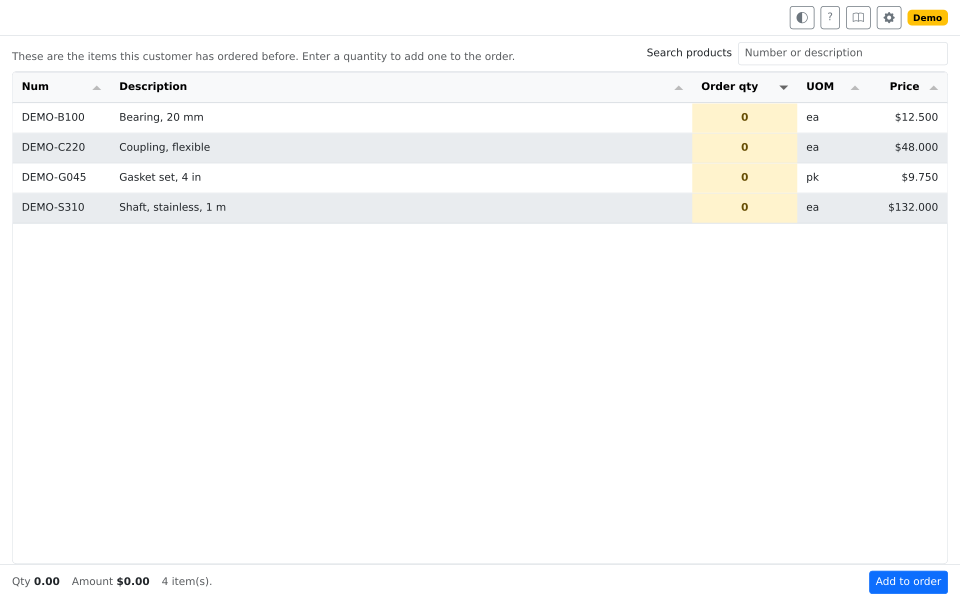
Lists every product this customer has ordered, priced for them. Type the quantities and add every line at once, with no part numbers to remember and no old orders to dig through.
What it's for
A repeat customer calls in an order, and most of it is what they bought last time. The person taking the call knows that, but not the part numbers. So they open the old orders in another window and retype them, one line at a time.
The price is another look-up: the list price, the last price this customer paid, or what their pricing rules work out to.
What it does
- Lists everything this customer has bought. Start it from the sales order's toolbar. Search by number or description as you type.
- Prices each line for this customer. An administrator picks the product price, the last price this customer paid, or your pricing rules. Pricing rules recalculate as the quantity changes.
- Adds every line at once. The footer totals as you type. Add to order closes the window on an order that shows the new lines.
- Shows more when you need it. Last quantity and date, quantity available, average cost, and margin are optional columns.
Use it for
- A repeat customer on the phone. Add what they took last time while they talk.
- A standing order that changes a little. Start from the history.
- A customer with years of history. Show only the last 90 days.
Good to know
- Only what this customer bought before. A new customer's list is empty.
- It adds lines to a saved order. It does not change lines already on it.
- Anyone who can open the page can add lines. Control who can reach it.
- Settings are for administrators: the admin user, or the QuickOrder Admin group.